Adding tools to the database
In the Tool database view, you can add tools.
RequirementYou have selected the desired machine from the machine list.
-
Open machine management with the following icon in the Main icon bar:

-
Select the Tool database tab.
-
Select the following button below the table:

-
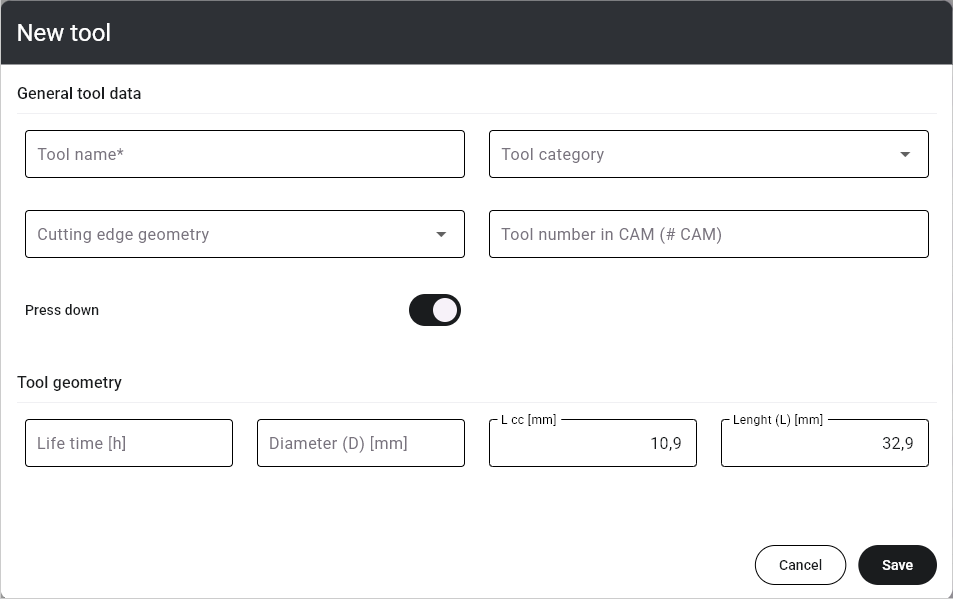
The New tool window opens.
-
Enter the desired data.
For standard tools, editing is limited to the tool life and the push-down function.
Control element
Description
Tool name
The tool name that dentalcnc uses throughout the user interface. For vhf tools, this is the tool match code.
Tool category
The material that the tool is used for.
D
The cutting edge diameter in millimeters.
Tool geometry
The shape of the cutting edge.
CAM
A unique identification number for the tool.
The CAM program uses this value to encode tool usage. This therefore requires coordination between the programs.
h
The maximum tool life as a decimal value in hours.
Since the actual maximum tool life depends on many factors, we recommend adjusting it to your operating conditions.
L cc
The length of the tool shank from top to the ring in millimeters.
L
The length of the tool in millimeters.
Push down
If activated, the machine pushes the tool downward when removing it from the tool magazine.
When the machine places the tools in the tool magazine, it may happen that they are not be fully pushed into the material. This puts a lot of strain on the tool ring when removing it.
To prevent this, use this function.
-
Click save to Save.