Machine settings
In the Machine settings section, you can define the dentalcnc manufacturing parameters that apply to the current machine. The configurable machine settings depend on the specific machine.
Opening machine settings
Requirement You have selected the desired machine from the machine list.
-
Open machine management with the following icon in the Main icon bar:

-
Select the Machine settings tab.
Options
|
Option |
Description |
|---|---|
|
Operation |
|
|
Remove coarse dust after the job is completed |
When activated, the machine blows coarse dust off the blank after machining using compressed air or the AirTool. When using the blank changer |
|
Activate the ionizer |
Activates or deactivates the ionizer on certain machine models. If this option does not appear for your machine although it is equipped with an ionizer, the option is always activated.
|
|
Mark the orientation of the discs |
When performing remounting on a partially used disc, its orientation must match the previous alignment exactly. When this option is activated, the machine mills 1 or 2 small markings into the discs, which you can use to align them with the markings on the blank holder during remounting. 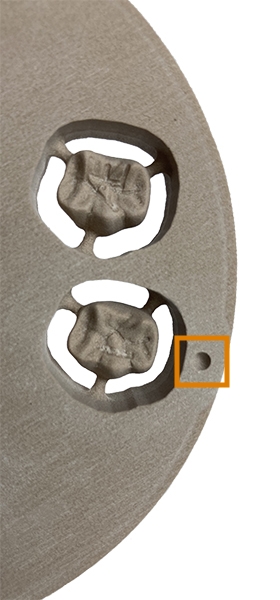
The positions of the markings vary depending on the machine model. When mounting the part on a different machine model, use the following template: Template for clamping positions |
|
Use central air extraction |
Activate this option if the machine is connected to a central exhaust system that neither you nor the machine controls. By default, the negative pressure sensor is calibrated when the working chamber door is being. If the suction unit or central air extraction is switched on during this calibration, the calibration will deliver incorrect values. This will lead to incorrect negative pressure monitoring. Activating this option switches off the calibration of the negative pressure sensor. |
|
Sensors |
|
|
Separate pressure sensor |
If a separate pressure sensor was retrofitted to your machine, activate this option to ensure correct sensor readings. |


