Manually resetting the blank changer to the default position
Cutting injuries caused by rotating tools
If a power failure or a machine malfunction occurs during machining, the spindle including the inserted tool keeps rotating. If you touch the rotating tool, you will suffer from cutting injuries.
- Wait until the spindle has stopped rotating before performing an emergency opening.
- Do not carry out the emergency opening during regular operation.
In some cases (e.g. when a power failure occurs) the blank changer Machine component which stores multiple blanks in a magazine and which can automatically load them into the working chamber.. When using the search, use a blank changer or a blank magazine instead may not be able to move back into default position. This will produce an emergency stop signal when the machine is started and the machine will not reference.
In this case a manual reset of the blank changer Machine component which stores multiple blanks in a magazine and which can automatically load them into the working chamber.. When using the search, use a blank changer or a blank magazine instead to default position is required.
- Open the working chamber door. If necessary, perform an emergency opening of the working chamber door. Emergency opening of the working chamber door
- Switch off the machine at the main power switch. Disconnect the machine from the eletrical source.
- Disconnect the machine from the external compressed air supply.
- Open the blank magazine Part of the blank changer in which you store the blanks for automatic loading. door.
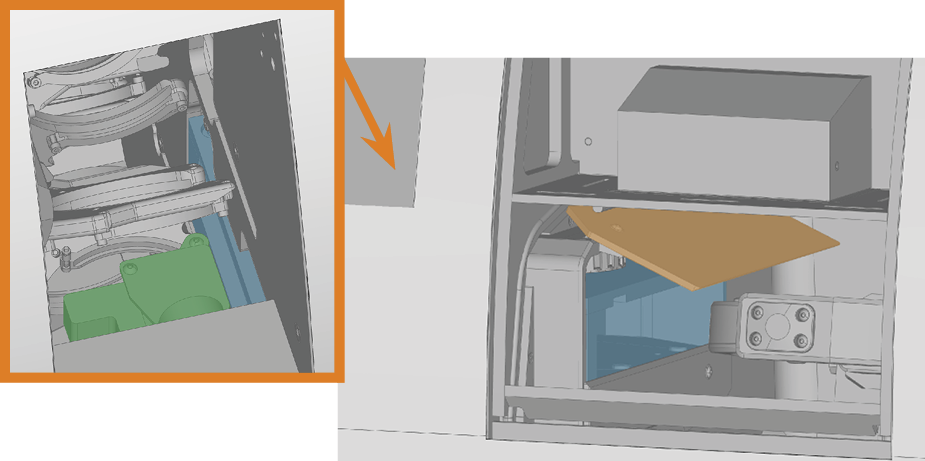
- With one hand open the blank changer Machine component which stores multiple blanks in a magazine and which can automatically load them into the working chamber.. When using the search, use a blank changer or a blank magazine instead flap (marked orange) in the working chamber.
- With the other hand push the loading unit of the blank changer Machine component which stores multiple blanks in a magazine and which can automatically load them into the working chamber.. When using the search, use a blank changer or a blank magazine instead (marked blue) towards the blank magazine Part of the blank changer in which you store the blanks for automatic loading. until you can reach the blank gripper (marked green).
- If there is a blank frame in the blank gripper, open the gripper and remove it.
- Close the blank gripper.
- Push the loading unit of the blank changer Machine component which stores multiple blanks in a magazine and which can automatically load them into the working chamber.. When using the search, use a blank changer or a blank magazine instead completely towards the blank magazine Part of the blank changer in which you store the blanks for automatic loading..
- Push the blank gripper into the end position at the left side of the machine.
- Open the gripper.
- The blank changer Machine component which stores multiple blanks in a magazine and which can automatically load them into the working chamber.. When using the search, use a blank changer or a blank magazine instead is in the default position.
- Close the working chamber door.
- If you performed an emergency opening, reactivate the safety interlock of the working chamber door. Emergency opening of the working chamber door
- Close the blank magazine Part of the blank changer in which you store the blanks for automatic loading. door.
- Connect the machine to the external compressed air supply.
- Connect the machine to the electrical source
- Switch on the machine at the main power switch.
- Start the CAM computer The computer that is connected to your machine and which runs dentalcam and dentalcnc..
- The machine references.